












Two Subtitles.Any Website.

The lightweight dual subtitle extension. No flashcards, no dictionaries, no grammar machinery — and we merge the official subtitle tracks whenever they exist, so your subtitles keep the jokes the studio wrote.

netflix.com/watch/70028883
EasyDualSub
Netflix playing Howl's Moving Castle with two subtitle lines at once: the French track in red above the English track in white.
4.7/5across the Chrome and Firefox storesChrome 4.7/5 (12) · Firefox 5/5 (1)800+ users

Simple

One job: two subtitle lines. Pick your languages, click ON, watch.

Smart Merge

Official studio tracks merged when they exist. AI translation only when they do not.

Universal

Netflix to Jellyfin to Coursera — and virtually any HTML5 player.

Native Support

Automatic on the platforms you already use

NetflixYouTubeDisney+Prime VideoMaxApple TV+

These six switch on by themselves. Every other site with a video player works too: turn its own subtitles on once and EasyDualSub takes over. Still stuck on a site? Send us the link and we add it.

What Makes EasyDualSub Different

Three convictions — and one thing we deliberately left out.

Our Difference

Smart Merge

Merge native tracks when possible. Translate when necessary.

AI translation flattens jokes, idioms and cultural references. When the platform already ships two official tracks, we pair them line by line instead — so you read what the studio actually wrote.

  • Official tracks merged — jokes and context survive
  • AI translation only as a fallback, never by default
  • When we do translate, the native track is fed in as context
  • No API key to bring — AI translation is included with the Monthly and Yearly plans
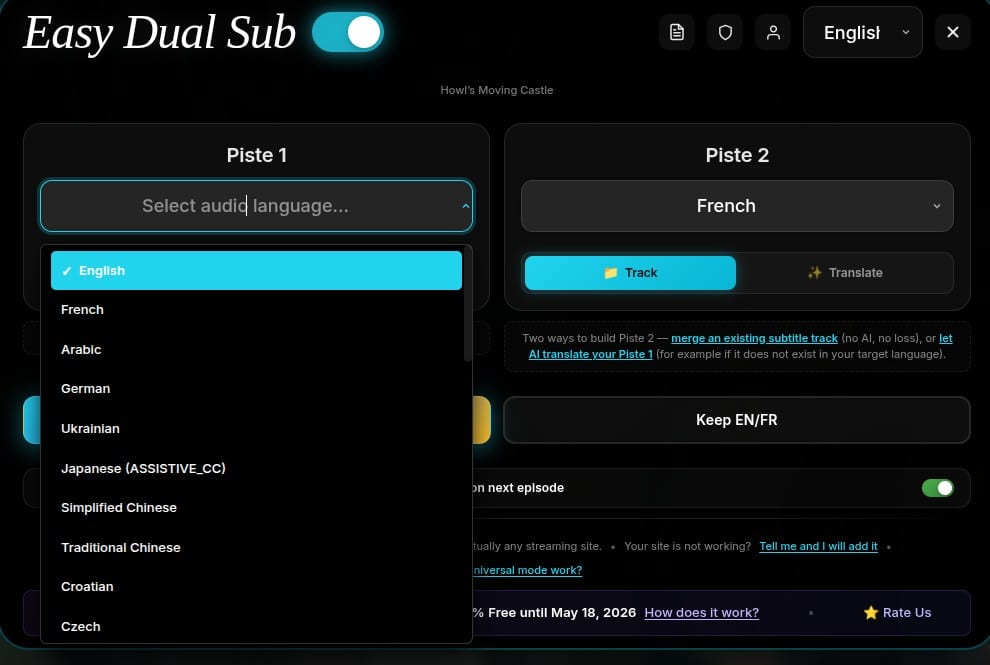
The EasyDualSub track panel: Track 1 open on a language list, Track 2 set to French, and a Track / Translate switch with the note "merge an existing subtitle track (no AI, no loss), or let AI translate your Track 1".

Track 2, two ways: merge an official track, or translate when none exists.

Zero Configuration

Simple by Design

No account to create, nothing to configure, no tutorial. Pin it, pick two languages, press play — that is the whole setup.

  • Pin the extension
  • Pick your top and bottom language
  • Press play

No language course attached

No flashcards, no SRS decks, no pop-up dictionary, no grammar analyzer — and no $5-$10/mo suite price for features you will never open.

Click, pick two languages, play. Nothing else to do.

Any Website

Universal by Default

Language Reactor is locked to Netflix and YouTube. Six platforms are fully automatic here — and everywhere else, from MangoTV to Jellyfin to your company portal, the extension detects the player and adapts.

  • Runs on virtually any HTML5 video player
  • Jellyfin, Plex-style servers and company video portals included
  • Not auto-detected? Turn the site's own subtitles on once and we take over
  • A site still refusing? Send us the link and we add it

Fully automatic on

NetflixYouTubeDisney+Prime VideoMaxApple TV+
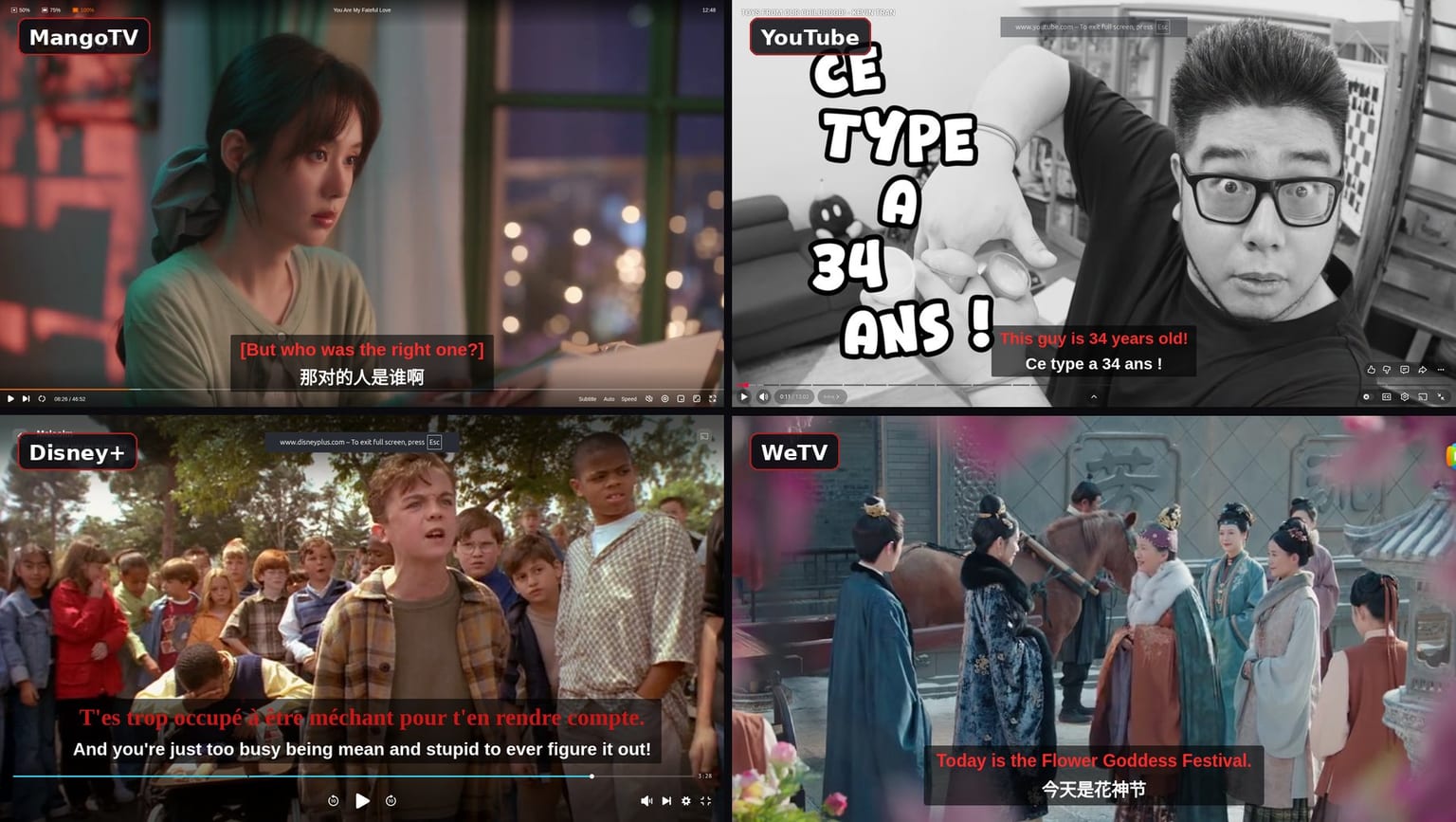
Dual subtitles running on four different sites at once: MangoTV with English over Chinese, YouTube with English over French, Disney+ with French over English, and WeTV with English over Chinese.

Works on any site with a video player — these four are just examples. If yours is not one of them, tell us and we make it work.

When You Want It

Yours to Adjust

Sensible defaults, every knob available. Including hiding the primary subtitle entirely, which turns EasyDualSub into a plain video translator.

  • Independent font size per subtitle track
  • Text color, background opacity, vertical position, gap
  • Hide the primary subtitle — translation only
  • Adaptive layout: subtitles lift when player controls appear
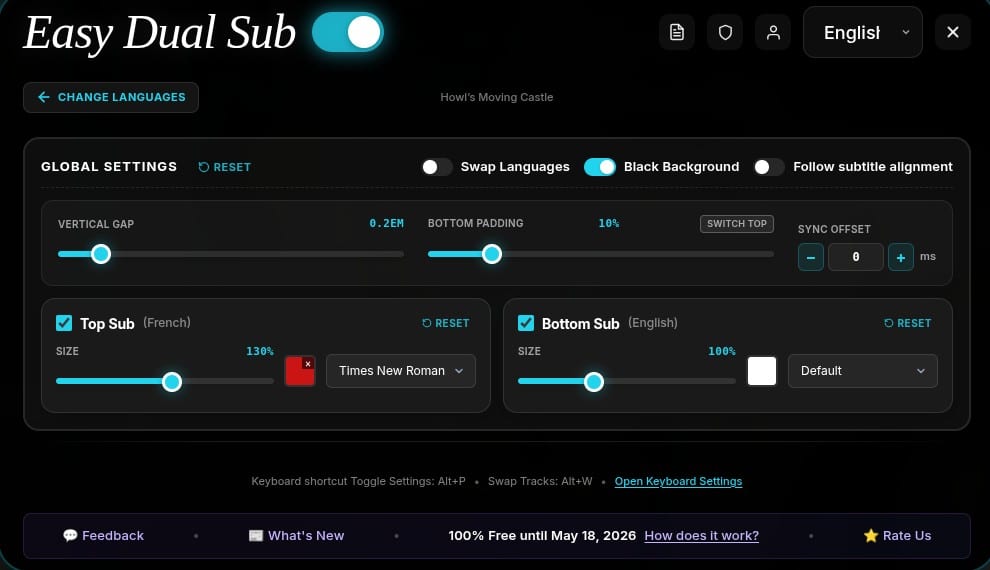
The EasyDualSub settings panel: vertical gap, bottom padding and sync offset, plus independent size, color and font for the top and bottom subtitle tracks.

One screen for every setting, with a live preview at the bottom.

Fits Any Player

It Adapts to the Player, Not the Other Way Around

Player controls slide in over the bottom of the picture — exactly where subtitles live. EasyDualSub notices and lifts both lines out of the way, then puts them back. Windowed or full screen, the text stays readable and nothing ever sits under the progress bar.

Controls hidden
Netflix with the player controls hidden: the two subtitle lines sit low in the picture, on their translucent background.
Controls showing
The same scene with the player controls showing: both subtitle lines have moved up so the progress bar never covers them.
Full screen
The same scene in full screen with the controls showing: the dual subtitles scale up and still sit clear above the progress bar.

Who Uses It

Not Only for Language Learners

Two subtitle lines solve more problems than one.

Language Learners

Comprehensible input, the practical way: the target language on top, your own language underneath as a safety net you only read when you need it.

Bilingual Couples & Families

Movie night stops being a negotiation. Both languages on screen at once — nobody has to watch in a language they are still working on.

Expats & International Students

Follow local shows and regional news while keeping an accurate translation in your mother tongue right below the line.

Deaf & Hard of Hearing

Pair the closed captions track with a translated one, and read both at the same time on any site.

Real Store Reviews

What People Actually Say

Every quote below is a real review on the Chrome or Firefox store. Follow the link on any card to read it there.

4.7/5· 13
“Fantastic!! You have no idea how many hours I spent fixing the stupid Disney+ subtitle style. Now I even enjoy the shows with dual subtitles!”
C
박지율 (Ciara Park)
Chrome Web Store
“For me, right now the best solution for dual subs with AI translation. It seamlessly integrates without any weird UI and is super easy to use. Perfect if you want to watch shows together with friends who have a different native language. Pricing is also fair.”
G
Gammelstulle
Firefox Add-ons
“A fantastic tool for language learners — having dual subtitles makes it much easier to follow along and pick up new vocabulary naturally. It works smoothly and really enhances the video-watching experience.”
M
mohan venkat
Chrome Web Store
“I love this extension, it's pretty useful :)”
I
Iconic Man
Chrome Web Store
“Great app for learning languages”
C
Cosmo Gateley
Chrome Web Store

Using EasyDualSub? A review on your store genuinely helps us keep it maintained.

Honest Comparison

Free Scripts, Learning Suites, and Us

Free tools exist, and so do expensive ones. Here is exactly what you trade away with each.

What matters
Free scripts
Learning suites

Language Reactor, Trancy, Migaku

EasyDualSub
Still working next month
Breaks on the next platform update
Maintained, but you pay a suite price for it
Actively maintained — fixes ship fast
What you are buying
One script, one site, no roadmap
A whole study platform you did not ask for
One feature: dual subtitles, done properly
Subtitle quality
Raw machine translation — jokes and context lost
Translate everything, even when an official track exists
Official tracks merged first, AI only as fallback
Where it works
Usually a single site
Often Netflix and YouTube only
6 platforms automatic + virtually any HTML5 player
Impact on your browser
Unpredictable, often abandoned code
Heavy: dictionaries, decks, overlays
Lightweight — no buffering, no CPU drain
When something breaks
A dead GitHub issue thread
Ticket queue
Email us the link — we make the site work
Price
€0

Paid in hours of troubleshooting

$5-$10/mo

For one feature out of twenty

~€2/mo

Or pay once, lifetime

Free costs you evenings. Suites cost you five times more for one feature. We cost about a coffee.

Fair Freemium

Generous Where It Counts

YouTube is free forever. Everywhere else you get a monthly allowance — and when it runs out we do not slam the door.

YouTube

Every YouTube video, unlimited, forever. It never touches your monthly quota — with or without an account.

Always 100% free

10 Free Videos Every Month

5 free videos per month straight after install, on every premium platform. Create a free account and it doubles to 10. Resets automatically each month.

Free account: 5 becomes 10 a month

The 15-Minute Soft Limit

Out of quota? You are not cut off. The extension keeps working on every video across the web — dual subtitles simply stop after the first 15 minutes.

First 15 min of any video, any site

Try Before You Pay

No trial to remember to cancel, because there is nothing to cancel: the free tier simply stays free for as long as you want to test it.

No credit card required

Why Go Premium?

Streaming platforms rewrite their players constantly. Premium is what pays for keeping up with them — so the extension still works next month, and the month after.

  • Unlimited on every platform, natively supported or not
  • No 15-minute limit, no monthly quota
  • Priority support, and we add sites on request
  • Lifetime option if you are done with subscriptions
See Plans

The Price of a Coffee

Around €2 a month for an extension that is actively maintained — against free scripts that break on the next platform update, and $5-$10 suites you only wanted one feature from.

Free Tier

€0forever

No credit card, no expiry

For casual viewers and anyone who mostly watches YouTube

  • 10 free videos/month with a free account (5 without)
  • YouTube unlimited — never counts against quota
  • Out of quota? First 15 min of any video still works
  • Full customization, all platforms
Get Started Free

Works in Chrome, Firefox and Edge

Premium

Recommended
€1.99/month

Billed €23.99/year

Unlimited dual subtitles, everywhere, on every site

  • Unlimited on every platform and any HTML5 player
  • No quota, no 15-minute limit
  • Priority support — broken site fixed on request
  • Smart Merge + AI translation (Monthly & Yearly plans), no API key

Cancel anytime. Secure payment via Stripe.

Pay Once. Done.

We understand — another €2 line on the statement every month. Take the Lifetime license instead: one payment, yours forever, no recurring charge ever again.

Why We Charge

Netflix, Disney+ and Max change their players without warning, and every change can break subtitle extraction. Free scripts die there. Your subscription is what funds the fixes — usually before you notice anything broke.

Frequently Asked Questions

The things people actually ask us before installing.

Two Languages. One Click.

Install it, pick your two languages, press play. That is genuinely the whole setup.

Add to Chrome - It's Free

Free to install. No account needed to start.

Also available for
View Pricing
  • Setup in 3 clicks
  • No tracking
  • YouTube always free